Copying Entities in a Linear Pattern
The Copy command lets you create a specified number of copies in a linear pattern.
The Copy and the CopyNested commands let you create a specified number of copies in a linear pattern.
Two methods are available:
- Create the number of copies at specified displacements, starting with a base point.
- Create the number of copies evenly spaced between two specified points, in the specified direction.
To create a specified number of copies in a linear pattern:
- Do one of the following:
- On the menu, click Modify > Copy.
- On the ribbon, click Home > Modify > Copy.
- Type Copy at the command prompt.
The CopyNested command is executed similarly.
- Specify the entities you want to duplicate and press Enter.
- Specify a source base point for the copy.
- Specify the Pattern option.
- Specify the number of copies in the linear pattern.
- Specify the second point. The two points define a displacement vector.
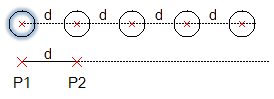
You specify a base point (P1 in the diagram) and a second point (P2) to indicate the distance (d) between the entities within the linear pattern and the direction of the linear pattern. The first entity in the pattern is created at the specified distance (d). Other copies of the specified entity are placed in the direction and with the distance (d) determined by the displacement vector.
- To finish duplicating entities, press Enter.
To create a specified number of copies between two points:
- Do one of the following:
- On the menu, click Modify > Copy.
- On the ribbon, click Home > Modify > Copy.
- Type Copy at the command prompt.
The CopyNested command is executed similarly.
- Specify the entities you want to duplicate and press Enter to complete your selection.
- Specify a source base point for the copy.
- Specify the Pattern option.
- Specify the number of copies in the linear pattern.
- Specify the Fit option.
- Specify the second point. The two points define a displacement vector.
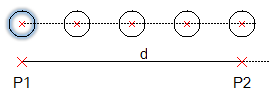
You specify a base point (P1 in the diagram) and a second point (P2) to indicate the distance (d) between the original entity and the last entity of the linear pattern, and the direction of the linear pattern. The entities are evenly spaced between the two specified points.
 The Pattern command is an effective tool to create multiple copies in a linear or circular pattern.