Adjusting the Space Between Dimensions
Use the SpaceDimension command to adjust the space between parallel linear or concentric angular dimensions that overlap or are not equally spaced. You can space parallel linear and angular dimensions automatically or at a specified distance.
The command applies equal spacing between specified dimensions.
 You can line up a series of linear or angular dimensions line by using a spacing value of 0.
To adjust the space between Dimensions:
- Do one of the following:
- On the ribbon, click Annotate > Dimensions > Adjust Space.
- On the menu, click Dimension > Adjust Space.
- Type SpaceDimension.
- In the graphics area, specify the dimension to use as base dimension.
- Specify the dimensions to space and press Enter.
- Do one of the following:
- Specify the Auto option and press Enter.
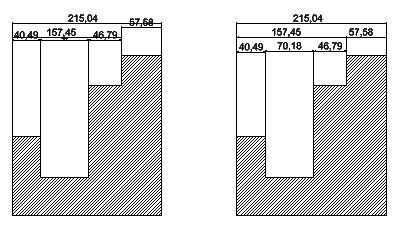
Specified dimensions are equally spaced based on the text height specified in the dimension style of the selected base dimension. The distance is twice the height of the dimension text.
- Specify a spacing value and press Enter.
Specified dimensions are equally spaced at the specified distance.
- Specify the Auto option and press Enter.
Example:
Access
Command: SpaceDimension
Ribbon: Annotate > Dimensions > Adjust Space
Menu: Dimension > Adjust Space
Parent Topic