Modifying Existing Dimensions for BIM Entities
There are the following methods for modifying dimensions for BIM entities:
- Using grip points
- Using the Properties palette
- Using the BIMDimensionEdit command
You can do various changes to existing dimensions:
- Add dimension points to a dimension
- Delete dimension points from a dimension
- Reverse the dimension direction
Use the BIMDimensionEdit command to modify existing dimension chains.
The command lets you:
- Add dimension points to dimension line
- Delete dimension points from dimension line
- Automatically dimension additional BIM entities within the same dimension chain
- Automatically update the dimension chain when a BIM entity is removed
The specialized tools for modifying dimensions are grouped on the Annotate panel of the BIM ribbon tab.
To add dimension points to a dimension line:
- Do one of the following:
- On the ribbon, click BIM > Annotate >
 .
. - On the menu, click BIM > Dimension > Dimension Edit > Add Point.
- Type BIMDimensionEdit and specify the Add points option.
- On the ribbon, click BIM > Annotate >
- In the graphics area, specify the dimension chain to modify.
- In the graphics area, specify the points to dimension and press Enter.
- Specify the dimension line using the chain index and press Enter. 0 means the first dimension line from the chain.
To delete a dimension point from a dimension chain:
- Do one of the following:
- On the ribbon, click BIM > Annotate >
 .
. - On the menu, click BIM > Dimension > Dimension Edit > Remove Point.
- Type BIMDimensionEdit and specify the Remove points option.
- On the ribbon, click BIM > Annotate >
- In the graphics area, specify the dimension chain from which to remove dimension points.
- On the BIM model, specify the point to remove.
Note: Make sure to specify only points corresponding to extension lines from the dimension chain.
To dimension additional BIM entities within a specified dimension chain:
- Do one of the following:
- On the ribbon, click BIM > Annotate > .
- On the menu, click BIM > Dimension > Dimension Edit > Add Entity.
- Type BIMDimensionEdit and specify the Add Entity option.
- On the ribbon, click BIM > Annotate >
- In the graphics area, specify the dimension chain to modify.
- Specify the BIM entities to dimension and press Enter.
Corresponding dimension points are added to the dimension chain.
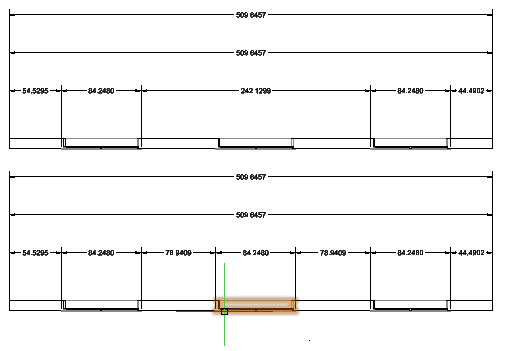
To detach a BIM entity from a specified dimension chain:
- Do one of the following:
- On the ribbon, click BIM > Annotate >
 .
. - On the menu, click BIM > Dimension > Dimension Edit > Remove Entity.
- Type BIMDimensionEdit and specify the Remove Entity option.
- On the ribbon, click BIM > Annotate >
- In the graphics area, specify the dimension chain from which to detach BIM entities.
- Specify the BIM entities to detach and press Enter.
The dimension points belonging to the specified BIM entities are removed from the dimension chain.
Access
Command: BIMDimensionEdit
Menu: BIM > Dimension > Dimension Edit
Parent Topic